
The first assistant director job in prep is mostly judgment: which scenes share a day, what happens if the lead's availability shifts, whether 5 2/8 pages in a practical apartment is realistic. Around that judgment is a lot of transcription. Numbering scenes, counting eighths, building strips, copying the day's scenes and cast onto a call sheet, and doing it again every time the board moves.
Storiara takes over a good share of the transcription. It doesn't take over the judgment, and it has gaps an AD will hit. This post goes through prep in the order an AD works and says where Storiara helps and where you'll do it yourself. The step-by-step button clicks are in how Storiara turns a script into a stripboard and the script to call sheet walkthrough.
Reading and breaking down the script
What Storiara does: it reads PDF, Word, Final Draft, Fountain, Highland, Celtx, and WriterDuet scripts, splits scenes from the headings without AI (so the same script gives the same scene list), takes INT/EXT, set, and day or night from each heading, and measures each scene in eighths from the PDF layout. AI then pulls characters, extras, locations, props, wardrobe, and music and effects, and checks each item against a quote in the script.
What you still do:
- Check scene numbers. Storiara reads them from the file, including numbers like 42A, and you can lock them so a new draft doesn't renumber the board.
- Check eighths on the long scenes against your own count. The counts are editable.
- Read every scene for what AI can't infer: a stunt that's implied, a "LATER" that's actually the next morning, a car that has to work. Add them in the Script & Breakdown View by selecting the text and choosing Add as Stunt, Vehicle/Animal, and so on.
- Check script days. Storiara tracks day or night and time of day per scene, but continuity across story days is your breakdown.
The warnings panel on the schedule is the closest thing to a second read. It checks each day against the production rules you set (hours per day, pages per day, turnaround) and keeps listing a day you deliberately let run over, so a problem you decided to live with does not quietly leave the list.
Building the board
What Storiara does: once you set shooting dates and daily hours, the stripboard shows each day with its call, its estimated wrap, and a time column down the left, with meals inline in time order. You drag scenes out of the boneyard onto days, expand a strip to see and drag its shots, and type a length on any strip. A length that would push the day past its limit is refused with the largest length that fits and a split across days offered, and you can override that deliberately on the day menu, which keeps the day in the warnings panel.
You can also schedule at the shot level. The Shotlist module is manual (no AI shot generation), but shots you build there can go on the board with durations in minutes, which suits a commercial or a dense action day.
What you still do, and it's most of the scheduling:
- Decide the order. There's no optimizer. You can sort and group strips, but nothing builds the board for you.
- Watch page totals. The day header shows time, not pages; the warnings panel flags a day over your pages-per-day limit. Check the shoot days estimator against your plan.
- Turnaround and rest. The warnings panel flags short turnaround and night-to-day flips, but nothing stops you scheduling them. The turnaround calculator is a quick check.
- Availability. The Production Availability panel beside the board shows cast, crew, locations, and props for the day in 15-minute slots, filled from availability requests people answer through a no-login form (with an option to import Google Calendar busy times). The warnings panel flags cast and locations scheduled on a day they're unavailable, but it won't block the move.
- Night shoots past midnight. Daily hours need an end time after the start time, so a production day can't cross midnight.
- Strip colors. Scene colors come from the Scenes page, not the INT/EXT and day/night convention. Set them by hand if the department expects the standard colors.
Tell the whole office this one: changing the production dates removes any scheduled scenes and shots that fall outside the new range. Print the board before you shorten the schedule.
Day-Out-Of-Days
What Storiara does: the Day-Out-Of-Days view fills a grid for each cast member linked to a character, based on the board. It assigns SW, W, WF, SWF, H, and I automatically, and the budget module counts cast paid days from this grid as every code except I and WD. You can click any cell, choose Override DOOD Code, and set T, R, WD, PW, PWF, or SR by hand. Reset to Auto undoes an override.
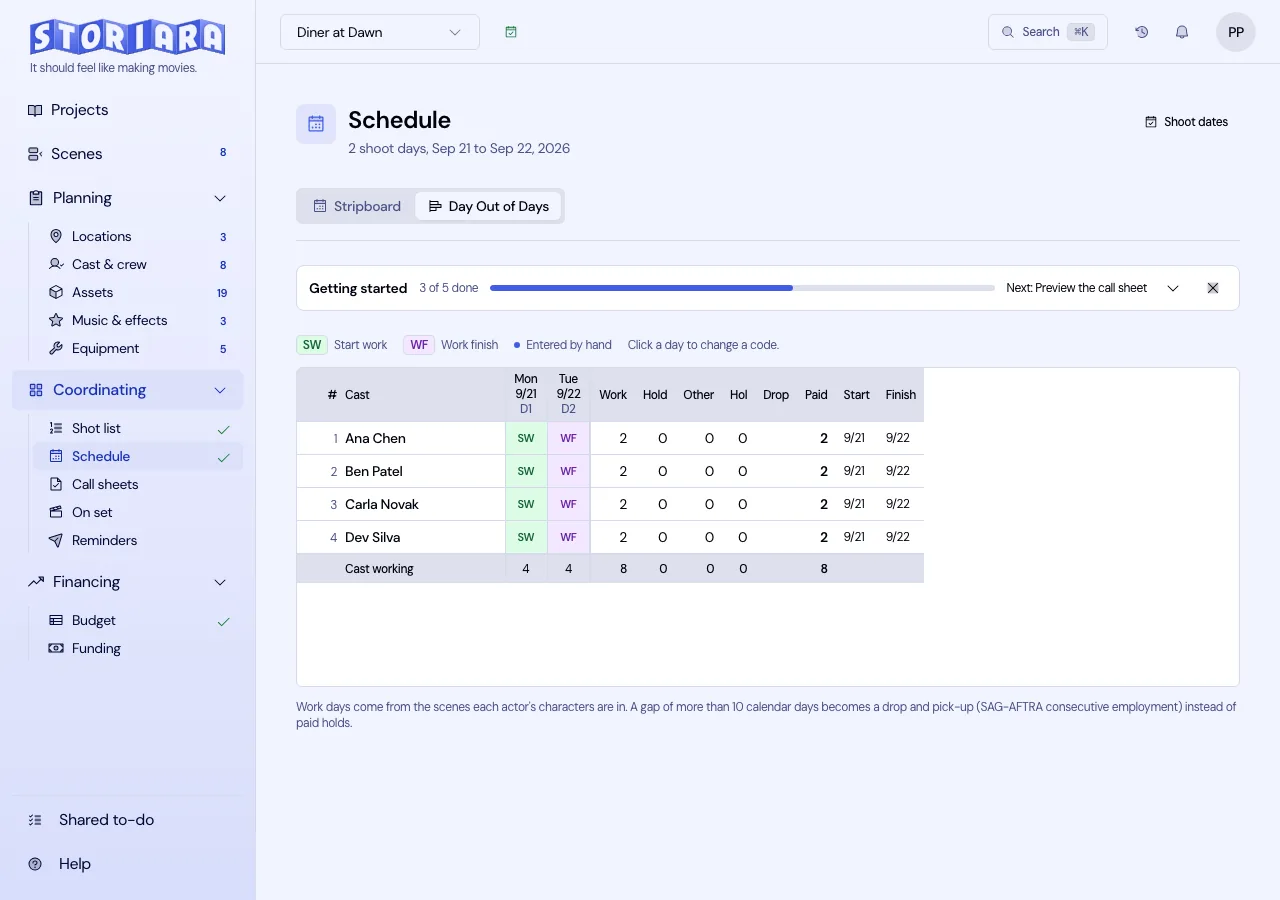
What you still do: decide drop and pickup. The auto grid holds an actor between work days; whether a gap long enough to drop them is worth it under your cast agreements is a call the software doesn't make. Rows are cast only. Background, stunt doubles who aren't cast records, and equipment aren't on the grid. The Day out of Days and drop and pickup entries cover the rules.
The nightly call sheet loop
What Storiara does: each shoot day's call sheet drafts from the board with scenes, pages, D/N, the day's cast with their DOOD codes, a Set Call per actor based on their first scheduled scene, locations, and a weather forecast. It emails selected cast and crew immediately or on a schedule (same day up to seven days before, at a set time and time zone), gives you one public link per day, and prints.
What you still do:
- Crew call and shoot call.
- Hair, makeup, and wardrobe calls for each actor. The Set Call default is the time they're needed on set, not in the chair.
- Parking, base camp, and safety notes from the permit.
- Chasing confirmations. Storiara tracks who confirmed; text message delivery needs your own Twilio account.
If the day went long and you move tomorrow's strips, rebuild that day's draft with Reset day from updated data on Callsheets. That discards manual edits for the day, so have your notes ready to paste back. For a two-day look-ahead, see advance call sheets.
The Reminders page sends one-off messages to selected cast and crew, now or scheduled. It's email, like the call sheet.
Working as a department
The story owner invites people by email and gives each a role: Admin, Producer/Manager, Assistant Director/Editor, Cinematographer, Department Head, Accountant, or Custom. A Custom role picks which sidebar items someone can open, which is useful for a 2nd 2nd who only needs Schedule and Callsheets. There's no read-only viewer role, and role limits apply in the app's interface. Edits show up live for everyone, and most items take comments, which beats a group text for "can scene 14 move to Thursday."
On set, the mobile view (in the browser, installable as a web app) has Scenes, Schedule, Assets, Callsheets with weather, and Share. It's mostly for reading. There's no native app, but the on-set pages work offline.
Output and handoff
The one-liner, stripboard, shooting schedule, and Day-Out-Of-Days export as PDF or Excel, strips export as CSV, and the whole schedule exports as a Movie Magic Scheduling (.mmsx) file. There's no production report module, so the daily production report stays in your usual template.
Is it worth it on your show
Storiara fits best where the AD is also the person doing breakdown, scheduling, and call sheets: shorts, indie features, commercials, music videos, and student productions. On a larger show with multiple units, the missing sub-boards and auto-scheduler may outweigh the time saved.
New accounts get a 7-day free trial, after which a paid plan is needed. The Producer plan is $39.99 per month, plus $19.99 per month for each additional collaborator. The first assistant directors page has a shorter overview.