Music & Effects
Music & Effects collects the requirements that are easy to forget during prep because nobody touches them until later: visual effects shots, specific sound effects, music cues, and stunts. Each one is linked to its scenes, so the VFX supervisor, stunt coordinator, and music supervisor can see their work scene by scene before the schedule is locked. The page has four tabs: Visuals, Sound, Music, and Stunts.

What the pull finds
The pull now runs automatically on upload, so the button above is no longer needed. AI lists effects and music it can find in the text, each checked against a quote from the script. "The radio plays 'Blue Moon'" becomes a music item. "The windshield explodes" might become a visual effect, a stunt, or both, depending on how it's written. Expect the list to be literal. The pull won't know that your night exterior needs sky replacement or that the phone screen will be a comp.
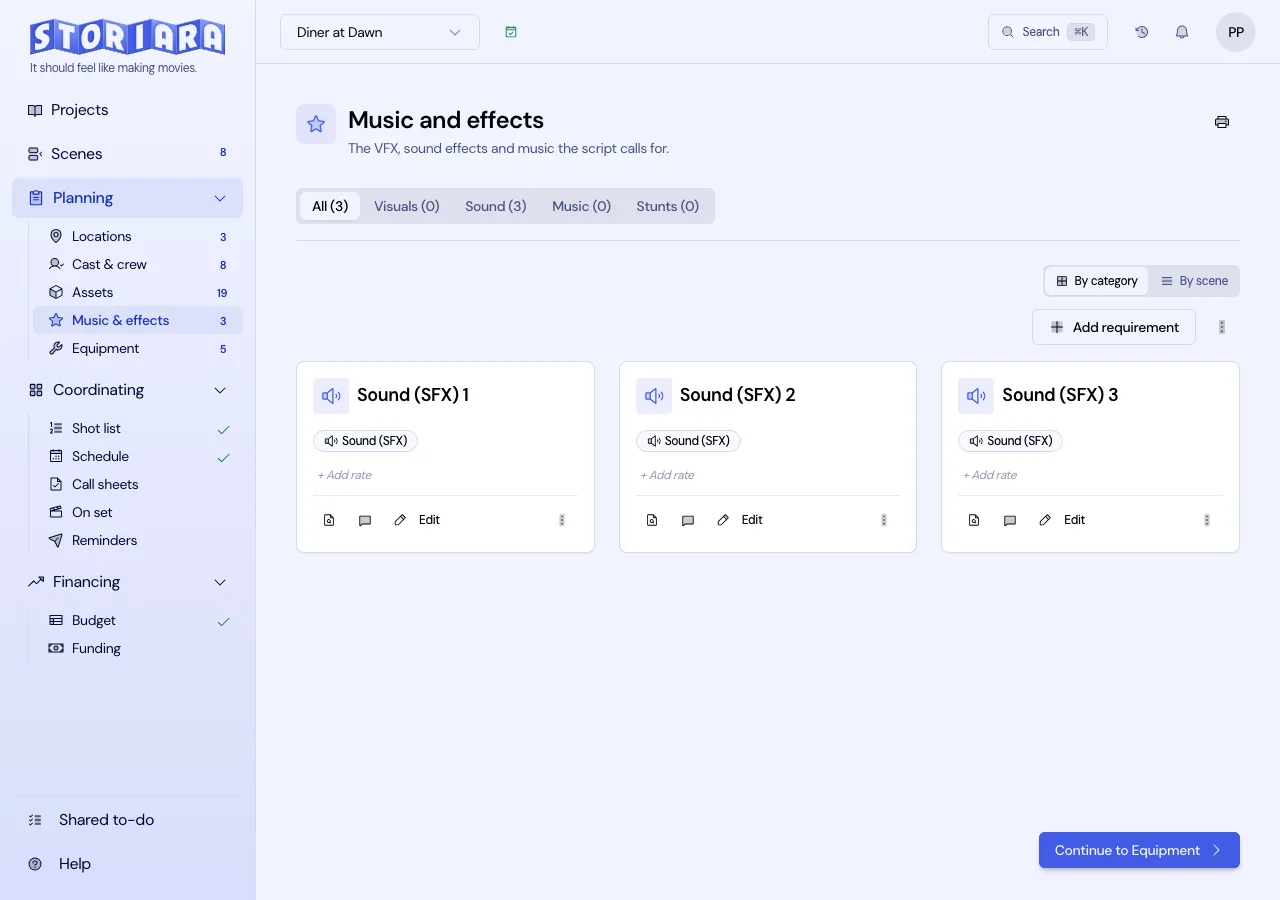
Review and add requirements
- Open Music & Effects in the Planning group. The header reads Music & Effects: with the story title.
- Pick All or a single tab. Each shows a count, for example Stunts (3).
- Click Add Requirement to add one, or the edit button on a card to change one.
- In the dialog, fill in Name (for example "Blue Moon, source, car radio"), Category, and Description. Category choices are Visuals (VFX), Sound (SFX), Music, Stunts, and Other.
- Under Scenes, use Add scene... to link every scene the requirement covers.
- Add an Estimated Rate ($) and Rate Unit if you have a quote, then save.
You can also highlight words in the Script & Breakdown View and choose Add as Visual FX, Add as Sound FX, Add as Music, or Add as Stunt. The form opens with the name and description filled in from the surrounding text.
Each card has Find in script to jump to the line, Comments for department notes, and a rate you can click to edit in place. On the card, rate units include Per Day, Per Week, Per Hour, Per Use, and Purchase. The estimated total multiplies by the number of linked scenes for Per Day and Per Use, so enter a flat quote (a composer's package fee, a stunt coordinator's flat for a sequence) as Purchase.
How to write requirements departments can use
Write one requirement per thing someone will bid, clear, or rig.
For visual effects, separate shots that need different work. "Sc. 22: monitor comp, 4 setups" and "Sc. 22: muzzle flashes" go to different vendors and cost different amounts. Note when you'll need clean plates or tracking markers, because that's a shoot-day cost the VFX supervisor has to put on the call sheet.
For sound, list the effects that change how you shoot: practical sounds that need playback on set, or scenes where you already expect to replace dialogue in ADR because the location is loud. Routine Foley doesn't need a line.
For music, mark each cue as source (heard in the scene) or score. Any song performed or played back on camera needs clearance before you shoot it, or you'll pay to replace it in post. Put the rights status in the description until it's cleared.
For stunts, name the gag and the performer: "Sc. 41: Maya falls down stairs (double)". A stunt usually changes the schedule, the call sheet, and the budget, so enter it early and tell the 1st AD it exists.
Clean up and print
- The menu next to Add Requirement has Delete All, which asks you to type DELETE ALL, and a selection mode with Delete Selected.
- The printer icon in the header prints the lists. Hand the VFX and stunt pages to those departments at the first production meeting.
Tips from prep
Run through this page with the 1st AD before scheduling. Stunts and practical effects add time per setup, and a day with two stunt gags and a wet-down rarely fits the page count of a talk day. When you build the stripboard, give those scenes longer durations.
Ask the director which songs they're already attached to. A writer's "she dances to Dancing Queen" is a music item on day one, and learning in prep that a song isn't clearable costs far less than learning it in the mix.
Limits
- The rates here don't feed the Budget page. The budget estimates VFX (4400), music (4600), and effects lines from its own tier tables, so carry quotes over by editing those line items.
- No clearance or licensing status fields. Use the description.
- No shot-by-shot VFX breakdown or vendor bidding.
- There's no export beyond print; the list isn't sent anywhere automatically.