Day out of Days (DOOD)
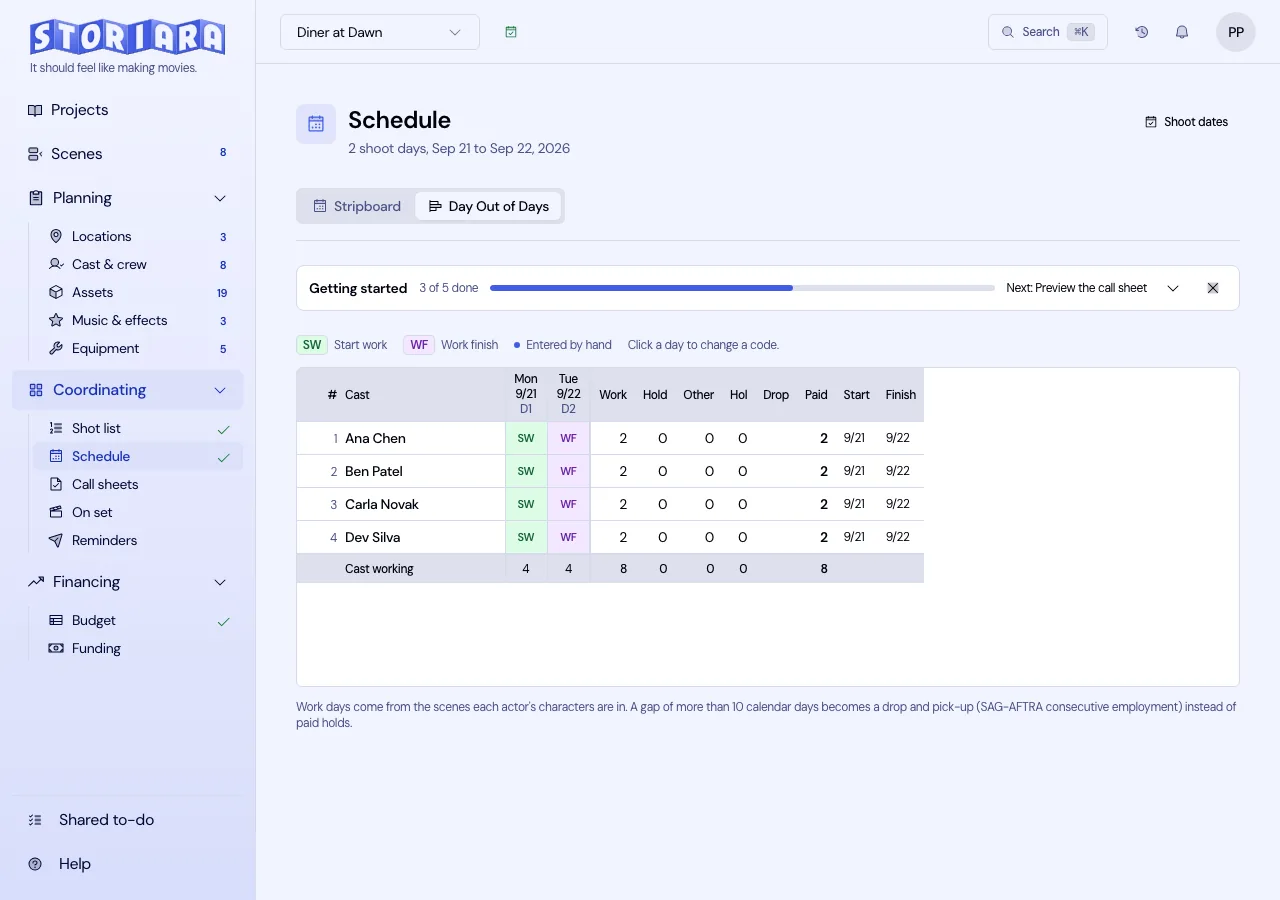
The Day Out of Days is a grid of cast against days. The stripboard tells you which scenes shoot when; the DOOD tells you when each actor starts, works, holds, and finishes, which is what casting, the SAG-AFTRA paperwork, and the cast budget need. Storiara fills the grid in from your schedule. It covers cast only. Crew, extras, locations, and equipment don't get rows.
Open the DOOD
- Open Schedule in the Coordinating group.
- Click Day Out of Days in the tabs under the page header.
The grid has one row per cast member. The name column holds the cast number and the name, and it stays pinned to the left while the days scroll sideways, so you never lose track of whose row you're reading. The day columns run from the first shoot day to the last, including the days in between: each is headed with the weekday, the date, and either its day number (D1, D2) or Off or Hol. On the right are totals for Work, Hold, Other (travel, rehearsal, and fittings), Hol, Drop, and Paid, then the actor's Start and Finish dates. The foot of the grid counts Cast working per day and totals each column.
Above the grid, the legend shows only the codes actually in use, plus the dot that marks a cell you entered by hand.
What makes an actor show up on a day
An actor gets a work day when a scene or shot scheduled that day includes a character they're assigned to. That chain has three links, and a missing one is the usual reason a row is blank:
- The character is linked to the scene (Cast & Crew, Characters tab, Scenes field).
- The actor is assigned to the character.
- The scene or shot is on the stripboard.
Characters without an actor don't appear. Rows are sorted by billing order from the Characters tab, so your lead sits at the top.
The codes
| Code | Meaning |
|---|---|
| SW | Start work |
| W | Work |
| WF | Work finish |
| SWF | Start-work-finish, when the actor works one day only |
| H | Hold |
| WD | Work, then drop |
| PW | Pick up, work |
| PWF | Pick up, work, finish |
| D | Dropped |
| T | Travel |
| R | Rehearsal |
| SR | Start rehearsal |
| FT | Fitting |
| HOL | Holiday |
| OFF | Day off |
| I | Not engaged |
How the grid fills itself in
Between an actor's first and last work day, every calendar day gets a code: a shoot day with none of their scenes is a hold, a company travel day is travel, a company holiday is a holiday, and a dark day is off. Outside that span they read as not engaged.
Drops are worked out for you. When the gap between two of an actor's work days is longer than the SAG-AFTRA consecutive employment window, Storiara drops them rather than paying holds across it: the last day of the first stint becomes WD, the days in between become D, and the day they come back becomes PW, or PWF if it's their last. The default window is more than 10 calendar days, and an actor is dropped at most once, which is what the domestic theatrical agreement allows. The note under the grid says so on the page.
Paid counts the days the production is paying for: work days, holds, travel, rehearsal, fittings, and holidays inside the span. Dropped days and not-engaged days don't count. That is the number the cast budget multiplies by the rate, so read it before you argue about a quote.
Here is a row on a two-week shoot for an actor whose scenes land on Day 2, Day 3, and Day 9, with the weekend between:
| Day | 1 | 2 | 3 | 4 | 5 | Sa | Su | 6 | 7 | 8 | 9 | Paid |
|---|---|---|---|---|---|---|---|---|---|---|---|---|
| Code | I | SW | W | H | H | OFF | OFF | H | H | H | WF | 8 |
The gap here is nine calendar days, inside the window, so they stay on hold and you pay for it. Move that last scene one day later and the same actor drops and is picked up, which is a real difference in the cast budget and worth checking before you lock the board.
Override a day
Click a cell and pick a code. An overridden cell shows a dot in its corner, and a code you typed always wins over the calculated one, including for the totals. Use this for a travel day the company didn't call, a fitting, or a rehearsal that lands on a shoot date.
Overrides stay in place when you move strips, so after a big schedule change, read the rows with dots against the new board.
Where the DOOD is used
- Budget. Each cast member's paid days set the quantity on their line in account 1400 (Cast), converted to weeks when their rate is weekly.
- Callsheets. Cast codes appear in the cast section of each day's call sheet, where you can edit them for that day.
- On set. The cast times on the daily production report start from the same cast list.
Print and export
With the DOOD showing, the printer icon prints it. Export in the toolbar writes the grid as Day Out of Days (PDF) or Day Out of Days (Excel), which is what casting and payroll usually ask for.
Limits
- Cast only. No crew, extras, location, vehicle, or equipment rows.
- The drop and pick-up rule carried is SAG-AFTRA domestic theatrical consecutive employment. It is not checked against the agreement your production actually signed.
- Columns start at the first shoot day, so an actor flown in a week before Day 1 can't get a travel code on it. Track pre-shoot travel and rehearsal in the deal and the budget.
- Rehearsal and fitting days are entered by hand unless they're on the schedule as events.
Related
- How to read the Day-Out-Of-Days
- How to build a stripboard
- How to print the schedule
- Schedule, Cast & Crew, Budget, Callsheets
- Glossary: day out of days, start work finish, hold day, drop/pickup, travel day
- Template: day out of days
- Tool: DOOD generator
- Guides: day out of days template, Exhibit G and SAG-AFTRA compliance