Assets (Props & Wardrobe)
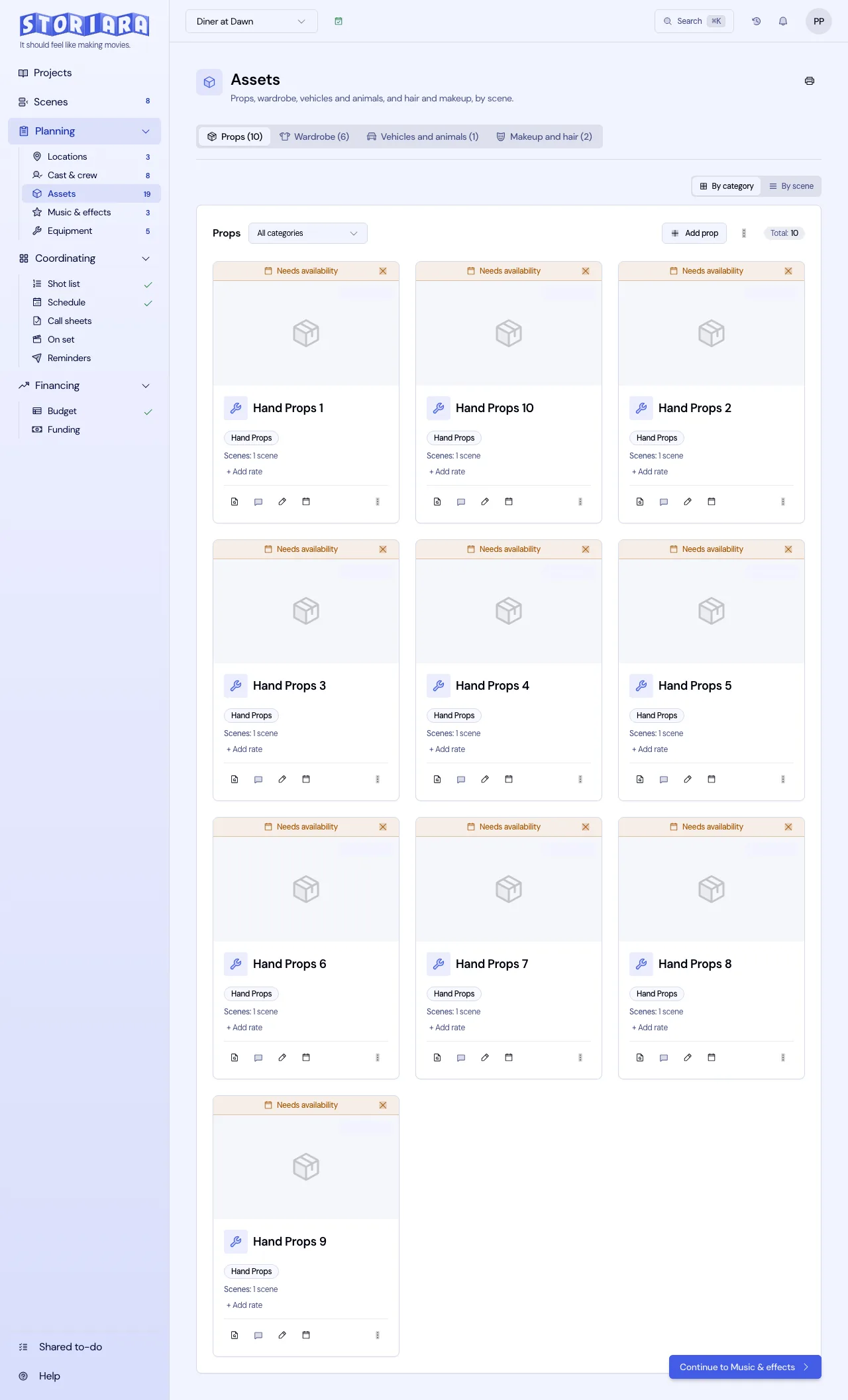
Assets is the art, costume, and makeup departments' page. It holds everything physical the script calls for, organized into four tabs: Props, Wardrobe, Vehicles & Animals, and Makeup & Hair. Each item is tied to the scenes it appears in, so the prop master can see what's needed on a given day and the costume designer can see every scene a change has to match.

What the script pull gives you
Current versions don't need the Pull from Script button above. When you upload a script, AI reads the action lines and lists props, wardrobe, vehicles, animals, and makeup and hair it finds, with the scenes each appears in. Every item is checked against a quote in the script before it's kept, so you'll see things that are written down. Implied items won't be there. If scene 31 says the lead "comes home soaked," nobody wrote "wet-down wardrobe, two sets," and that's the costume designer's call to add.
Review the lists
- Open Assets in the Planning group.
- Pick a tab. Each shows a count, for example Props (24).
- Switch between By Category and By Scene. By Scene is the view to use when you're prepping a shoot day or checking continuity across a sequence.
- Filter by category with the buttons along the top of the tab (All plus each category).
Categories on each tab:
| Tab | Categories |
|---|---|
| Props | Hand Props, Set Decoration, Furniture, Electronics, Documents, Weapons, Food/Drinks, Other |
| Wardrobe | Costume, Accessories, Shoes, Undergarments, Period Pieces, Contemporary, Formal Wear, Other |
| Vehicles & Animals | Picture Car, Service Vehicle, Animal Actor, Livestock, Other |
| Makeup & Hair | Special Effects Makeup, Prosthetics, Wigs/Hairpieces, Basic Makeup, Hair Styling, Other |
Add or edit an item
- On the tab you want, click Add Prop, Add Wardrobe Item, Add Vehicle/Animal, or Add Makeup/Hair look. To edit, click the pencil icon (tooltip "Edit details").
- Fill in Name, Category, and Description (all required).
- On Wardrobe and Makeup & Hair, pick the Character who wears it.
- Pick at least one scene under Scenes. The field is outlined in red until you do.
- Add Size, Color, and Material/Make where they matter.
- Enter Estimated Rate ($) and Rate Unit (Per Day, Per Week, Per Hour, Per Use, or Purchase).
- Add Notes and Photos (Optional), then save.
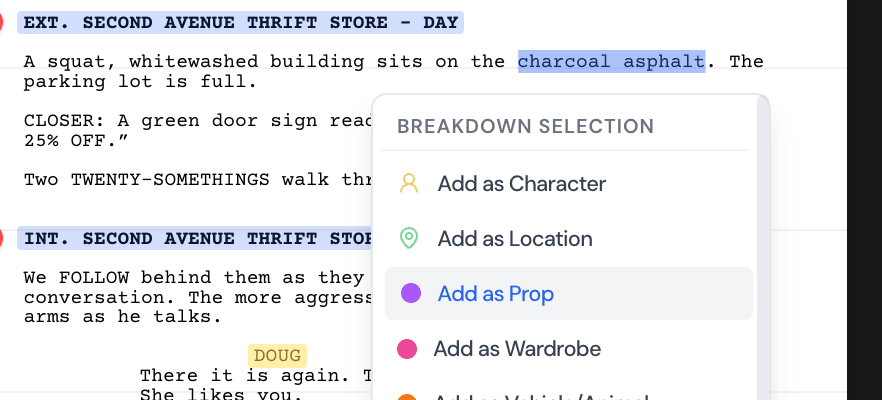
You can also add items from the script itself. Highlight the words in the Script & Breakdown View and choose Add as Prop, Add as Wardrobe, Add as Vehicle/Animal, or Add as Makeup/Hair. The form opens with AI-filled name, description, category, and details like size or color taken from the surrounding text.
Rates, availability, and shopping
Click the rate on a card to change it in place. The estimated total works on the number of linked scenes: Per Day and Per Use multiply by the scene count, Per Week by the scene count divided by 5 (rounded up), and Per Hour assumes 2 hours per scene. Purchase is a flat amount. A rented period sofa at $150 a day in 6 scenes totals $900 whether you shoot those scenes in one day or four, so for rentals that span many scenes, Purchase with the full rental amount is usually closer to the real invoice.
New items show Needs Availability until you set when they can be used. That matters most for things you book, like a picture car or an animal actor. Click the calendar icon (tooltip "Manage availability") to set dates and times, or click the X on the banner to mark the item always available. Availability appears in the Schedule page's day sidebar.
The cart icon (Find) opens Buy matching items on Amazon with product matches for the item's name. It's handy for an expendable hand prop you'll buy anyway. Check prices and delivery dates yourself before you rely on them for a shoot day.
Every card also has Find in script and Comments. Use comments for notes between departments, like the prop master confirming the hero phone matches the one in the insert shot.
Clean up and print
- The three-dot menu has a multi-select option for deleting several items, Delete All for the current tab, and Delete Everything for all four tabs. Delete All asks you to type DELETE ALL before it runs.
- The printer icon prints the asset lists.
Tips from prop and costume prep
Name items the way the department will say them on set. "Hero coffee mug (chipped)" and "Stunt mug (rubber)" are two items with two rows, not one item with a note. Storiara doesn't track quantities or multiples, so breakaways, doubles for stunt performers, and continuity sets need either separate items or a clear count in Notes, such as "x6 breakaway, 2 for rehearsal."
For wardrobe, create one item per change per character, and link it to every scene where that change is worn. When the By Scene view shows "Change 3" in scenes 14, 15, and 38, the costume supervisor knows 38 has to match a scene shot weeks earlier.
Limits
- No quantity, multiples, or duplicate tracking.
- No purchase orders, receipts, or actual-cost tracking; the rate is an estimate.
- Set dressing and greenery go under Props categories; there's no separate set dressing tab.
- Amazon product matches are a shopping shortcut, not a vendor list.
- Output is print only.